Elchi: every proxy, every edge, one control plane.
With Elchi you configure, validate and publish listeners, routes, clusters and certificates for every proxy from one place, and protect your APIs at the edge with Elchi Shield and Elchi API Discovery.
Free tier: Elchi Core with one managed client, no license needed.
View architecture
Works withKubernetesEnvoyGrafanaOpenStackLDAP / ADLet's EncryptOpenRouter
What is Elchi?
Elchi is a self-hosted control plane with a web UI for fleets of Envoy proxies. In Elchi you edit listeners, routes, clusters and certificates in typed forms instead of hand-writing xDS or YAML; Elchi validates each change and publishes it to the proxies that the Elchi agent runs on each Linux host. Elchi Shield (WAF), Elchi API Discovery and Elchi GSLB are add-ons.
Elchi Core and three add-ons.
Start with Elchi Core — the base of the Elchi platform — and license security, discovery, and traffic products as you need them.
Elchi API Security
Shield is an ext_proc sidecar next to each Envoy: authentication, rate limiting, bot defense, data-loss prevention and a WAF built on Coraza and the OWASP Core Rule Set, composed per route and rolled out from detect to block.
Add-on · Requires CoreLearn moreElchi API Discovery
Turns live traffic into a continuously scored API inventory: shadow endpoints, missing auth, PII in URLs, drift — with a one-click path from finding to protection.
Add-on · Requires CoreLearn moreElchi GSLB
Authoritative DNS from elchi-coredns, driven by health checks the controller runs: unhealthy edges leave the answer, regions get nearby IPs, and a record with no healthy IP falls back to its failover name.
Add-on · Requires CoreLearn moreElchi Core
Base platformThe foundation of the Elchi platform: a visual control plane for your entire Envoy fleet — full xDS, several versions side by side, draft/save/publish with an audit log, and an edge agent that runs Envoy on your hosts.
Learn moreWhat Elchi does, feature by feature.
Typed editors, two-step validation, versioned rollouts and edge security, all in Elchi.
Proto-Driven Configuration
Elchi generates its typed models and field metadata from each proxy version's protobufs. Listeners, Clusters, Endpoints, Routes — with full TypeScript safety.
Interactive Dependency Graphs
Diagrams of how listeners, routes, clusters and endpoints depend on each other, to follow a request and find what a change affects.
Shield — Edge API Security
A per-edge ext_proc sidecar that enforces API security in the request path: WAF (OWASP CRS), authentication, rate limiting, and bot defense — twelve engines plus built-in DLP, rolled out safely from detect to block.
API Discovery & Inventory
Turn live traffic into a continuously-scored inventory of every API you expose — shadow endpoints, missing auth, PII leaks, enumeration — check it against your OpenAPI specs and export it as OpenAPI.
Quick Start Scenarios
Guided wizards that build a complete set of resources for common setups, such as an HTTP or TCP proxy, plus your own reusable scenarios.
Lightweight Edge Agent
A lightweight agent on every edge host. Auto-registration, health monitoring, log export to Syslog/ELK.
Full xDS Protocol Support
Complete implementation of xDS (ADS, CDS, EDS, LDS, RDS, VHDS). Delta xDS for efficient updates.
Two-Step Validation
Validation in the editor and again on the server ensures configurations are correct before deployment.
Save & Publish Workflow
Draft mode for safe configuration changes. Save incrementally and publish bulk updates atomically. Every change is recorded in the audit log.
Multi-Version Support
Run several Envoy versions from one Elchi. Each proxy is served by a control plane built for its own version, and a listener moves to a newer version by hot restart.
Project-Based Multi-Tenancy
Organize configurations by teams, environments, or customers. 4-tier RBAC (Owner, Admin, Editor, Viewer).
Elchi vs. hand-written xDS and a service mesh.
Compared on what platform teams check before they choose. A service mesh is the better fit when you need mTLS and policy between pods inside Kubernetes; Elchi manages the proxy fleets at your edge.
| What you need | Elchi | Hand-written xDS / go-control-plane | Service mesh (e.g. Istio) |
|---|---|---|---|
| Edit proxy config without writing YAML or xDS code | Yes. Typed forms generated from each version’s protobufs | No. You write the YAML, or Go code against go-control-plane | Partly. Mesh resources; raw Envoy settings through EnvoyFilter patches |
| Checked before it reaches a proxy | Yes. Validated in the editor and again on the server | Partly. Only the checks you build into your pipeline | Partly. Schema checks on the mesh’s own resources |
| Runs on plain Linux hosts and VMs | Yes. The Elchi agent runs each proxy as a systemd service | Yes. With your own deployment tooling | Partly. VMs join a mesh whose control plane runs on Kubernetes |
| Several proxy versions at once | Yes. One Elchi control plane per version; listeners move by hot restart | Partly. If you build and run it | Partly. Through control-plane revisions during an upgrade |
| Draft, publish and an audit log for every change | Yes. Save as a draft, publish atomically, every change recorded | Partly. Git history, if you build the workflow | Partly. Through your GitOps tooling |
| WAF and API discovery in the same control plane | Yes. Shield (OWASP CRS via ext_proc) and API Discovery add-ons | No. Separate tools to integrate | No. Separate products to integrate |
| mTLS and traffic policy between pods inside Kubernetes | No. Not a sidecar mesh: Elchi manages edge and gateway fleets | Partly. Only what you configure yourself | Yes. The core job of a service mesh |
| Cost | Free tier with one managed client; licensed by client count above that | Open source; you pay in engineering time | Open source; you run and upgrade the mesh |
What sets it apart
AI-Assisted Analysis
On-demand AI review of configuration and logs, with your own OpenRouter key.
Proto-Driven Models
Elchi's typed models come from each version's protos, so its editors follow the proxy API closely.
Version Routing
Each proxy is served by the Elchi control plane of its own version.
Multi-Tenancy & Audit
Projects isolate teams; 4-tier RBAC, two-factor authentication and an audit log of every change.
Zero-Downtime Upgrades
Move a listener and its resources to a new version and cut over with a hot restart, without dropped requests.
Enterprise Auth
LDAP / AD integration for centralized authentication and authorization.
Log Centralization
Ship logs with Filebeat to Elasticsearch or Logstash, or through rsyslog.
Metrics
Built-in per-service dashboards, plus Grafana integration.
The Elchi UI, captured from a live environment.
Elchi with real traffic, Shield blocks and discovered APIs. Drag the slider to see each screen in light and dark.
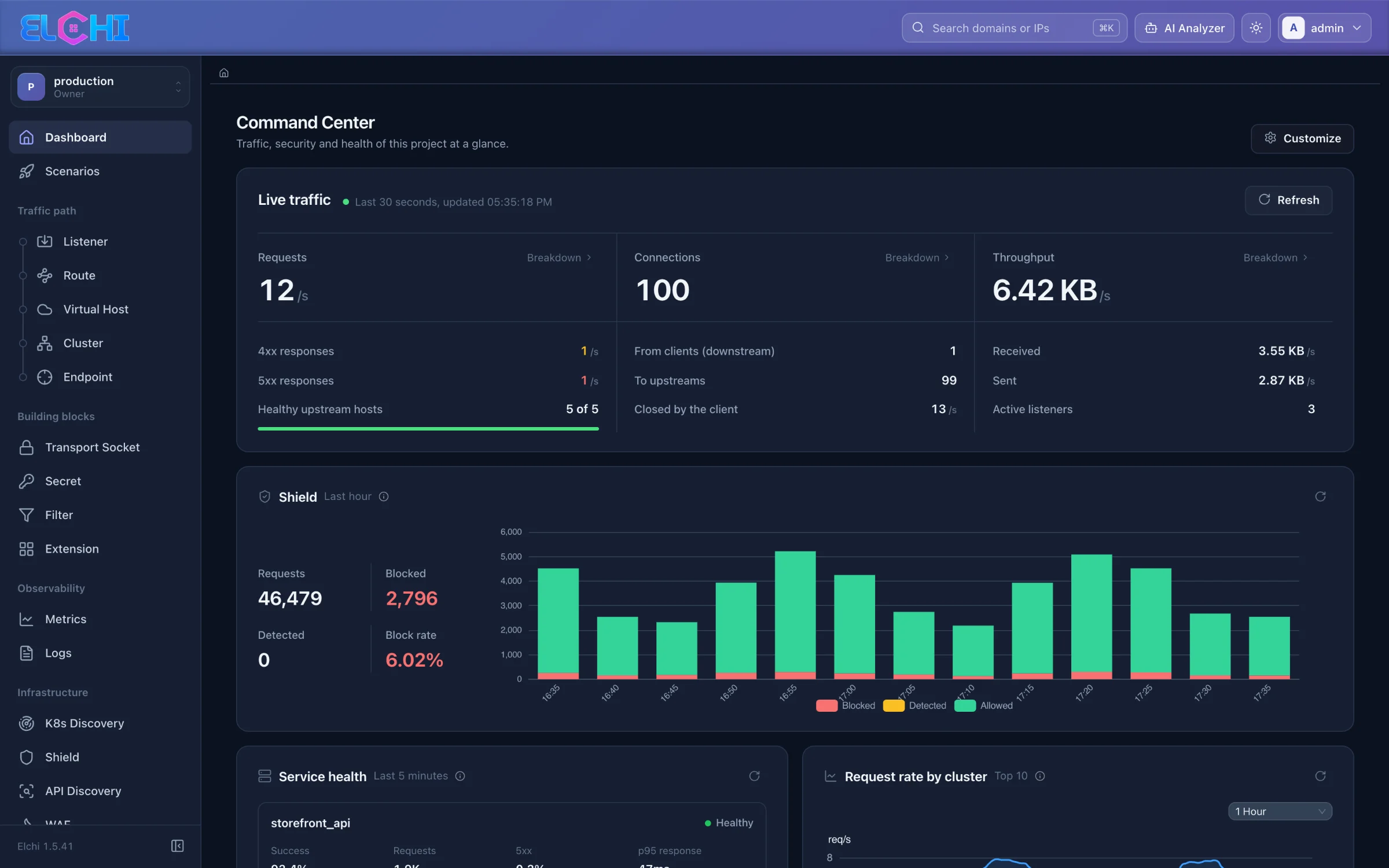
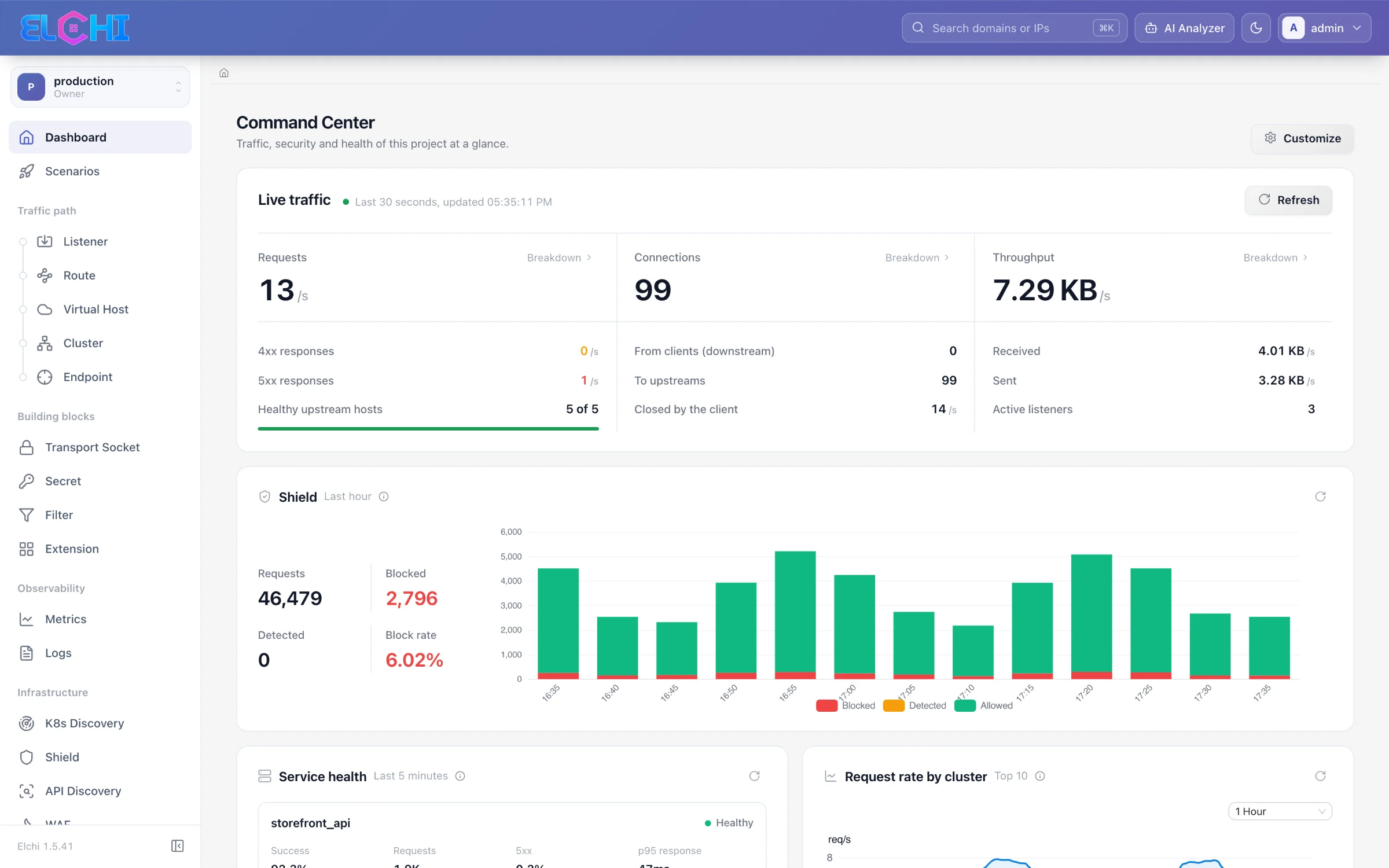
Elchi architecture: Registry, Controller, Control-Plane.
Three processes plus a lightweight agent on every edge host. Run several Controllers and Control-Planes; the Elchi Registry sends each client to a control plane built for its version.
Registry
routingService discovery and routing hub
- Controller registration
- Client location tracking
- Version-based routing
- Automatic cleanup
Controller
APIAPI and management layer
- Client management & dispatch
- xDS resources (CDS, LDS, RDS, EDS)
- RBAC & authentication
- Persistent config store
- AI config analysis
- K8s discovery
Control-Plane
xDSxDS control plane
- Client ADS
- VHDS (Virtual Host Discovery)
- Snapshot management
- Live updates
- Auto-registration
- Health & keepalive
High Availability
Multiple control-plane instances with automatic failover, and active/passive edge pairs that share VIPs
Scalability
Run several controller and control-plane instances and spread the clients across them
Version Routing
Each client is served by a control plane of its own version
Six ways teams use Elchi.
Common deployments, each linked to the docs page that sets it up.
API Gateway Management
Run your edge clients as an API gateway in front of microservices, managed centrally.
Shield docs- Rate limiting & traffic control
- Authentication & authorization
- Request/response transformation
- API versioning & routing
Load Balancing & Traffic Steering
Use Elchi to run load balancers in front of your services, with health checks and controlled rollouts.
Blue/green guide- Weighted traffic splitting & canary
- Circuit breaking, retries & outlier detection
- Active health checks
- Metrics & live traffic view
Multi-Site & Multi-Cluster Backends
Put edge fleets in front of several sites and Kubernetes clusters, managed from one control plane.
GSLB docs- Kubernetes node discovery per cluster
- GSLB failover between sites
- Active/passive edge HA pairs
- Unified policy enforcement
Multi-Team Platforms
Client management with project-based multi-tenancy and role-based access control.
Access control docs- Team-based config isolation
- Complete audit trail
- Centralized policy management
- Self-service configuration
Cloud-Native Applications
Run the control plane on Kubernetes and keep the edge proxies in step with your clusters.
Helm install- Control plane on Kubernetes via Helm
- Kubernetes node discovery
- Zero-downtime listener upgrades
- Health checking & monitoring
Edge Proxy & Ingress
Use Elchi at the edge to terminate TLS, protect incoming traffic and route it.
ACME certificates docs- SSL/TLS termination with ACME certificates
- Rate limits & connection limits
- Bot & IP-reputation blocking (Shield)
- Region-scoped DNS answers with GSLB
How-to guides
- GuideManage proxies without hand-writing xDS or YAML
- GuideRun several versions and upgrade listeners with zero downtime
- GuideAdd a WAF (OWASP Core Rule Set) with Elchi Shield
- GuideFind shadow and undocumented APIs from access logs
- GuideGSLB and DNS-based failover with Elchi
- GuideBlue/green deployments with EDS
Ready to simplify your traffic management?
Book a demo to walk through Elchi with your own setup in mind, or install the free tier on Kubernetes with the Helm chart and manage one client without a license.
- Ready To Use
- Self-Hosted
- Multi-Version Proxy
- Agent Support
How a change ships
- Saveas a draft
- Validatein the editor and on the server
- Publishto the fleet, atomically
Every change is recorded in the audit log.